


"Saves a lot of time and prevents embarrassing typing errors." — Richard S.
Simplifies the maintenance of your contact data.
SigParser Use Cases & Applications
SigParser transforms how professionals manage contact information by automating the extraction and organization of contact data from email signatures. Eliminate manual data entry, reduce errors, and maintain accurate contact databases effortlessly across multiple platforms.
Primary Use Cases
Extract Email Signature Data
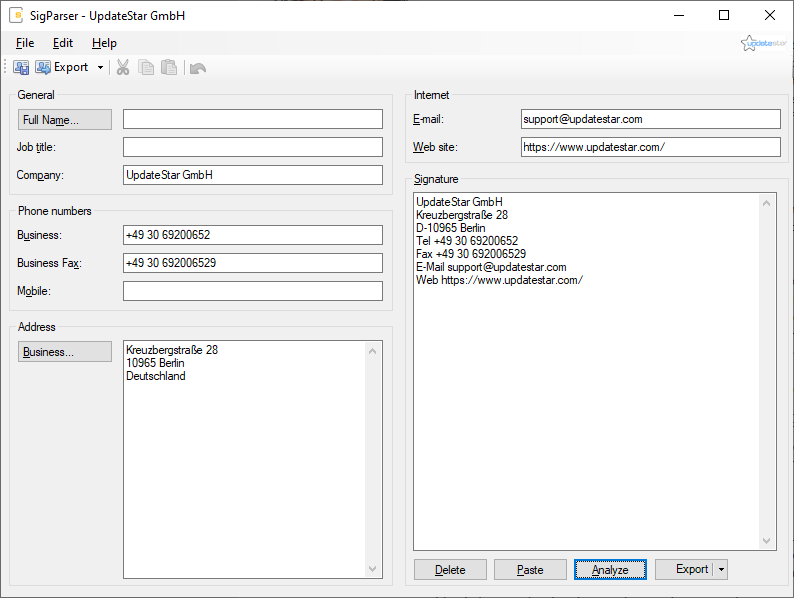
Instantly extract contact information from email signatures received from clients, prospects, and business partners. Copy signature text, paste into SigParser, and receive structured contact data ready for export.
Create New Contacts
Generate new contact entries directly in Microsoft Outlook or Mozilla Thunderbird from analyzed signature data. Eliminate manual field-by-field data entry and save minutes per contact.
Update Existing Contacts
Refresh contact information when business associates change roles, phone numbers, or addresses. SigParser detects existing contacts and updates fields automatically, preventing duplicates.
Build Business Networks
Rapidly expand professional contact databases by processing signatures from networking events, conference communications, and new business introductions.
CRM Database Population
Populate CRM systems and contact management platforms efficiently by exporting extracted contact data as vCard files or direct integration with email clients.
Maintain Data Accuracy
Reduce transcription errors inherent in manual data entry. SigParser accurately captures information exactly as provided in source signatures, ensuring database integrity.
Return on Investment
SigParser delivers measurable time savings and productivity improvements from the first contact processed. The efficiency gains quickly justify the investment.
Time Savings Calculation:
- Manual Contact Creation: Approximately 2 minutes per contact including opening contact form, copying individual fields, correcting entries, and saving
- With SigParser: Less than 30 seconds including paste, automatic analysis, verification, and export
- Time Saved: 90 seconds per contact, or 1.5 minutes of productive time
- After 40 Contacts: 60 minutes saved — one full hour of productive work time
- License Cost: Only $24.95 for single-user license, creating positive ROI after approximately 20 contacts
Common Workflows
Analyzing Email Signature Data
Process incoming email signatures to extract structured contact information for new business contacts.
- Receive Email: Open email from new business contact in your email client
- Select Signature: Highlight the email signature block containing contact information
- Copy Text: Press Ctrl+C to copy signature text to clipboard
- Launch SigParser: Open SigParser application by clicking desktop icon
- Paste Content: Click "Paste" button in signature field to insert copied text
- Automatic Analysis: Click "Analyze" button — SigParser recognizes and categorizes contact fields
- Verify Data: Review extracted information in individual fields (name, title, company, phone, email, address)
- Correct if Needed: Make manual adjustments to any fields requiring refinement
Creating New Contact Entries
Export analyzed contact data directly into your email client or contact management system.
- Complete Analysis: Ensure SigParser has successfully analyzed signature data and populated contact fields
- Review Information: Verify all contact fields contain accurate information
- Select Export Target: Choose destination — Microsoft Outlook, Mozilla Thunderbird, or vCard file
- Click Export: Press "Export" button to initiate contact creation process
- Integration Processing: SigParser communicates with selected application to create contact entry
- Contact Created: New contact appears in address book with all fields populated
- Immediate Use: Contact is ready for email communication, phone calls, or CRM integration
Updating Existing Contacts
Refresh outdated contact information when business associates provide updated signatures.
- Extract New Information: Analyze updated email signature using standard SigParser workflow
- Initiate Export: Click "Export" button to update contact in email client
- Duplicate Detection: Email client alerts that contact already exists in address book
- Choose Update: Select "Update Existing Contact" option to refresh information
- Field Replacement: New information overwrites outdated fields in existing contact record
- Preserve History: Email client maintains conversation history and custom notes
- Contact Updated: Address book now contains current contact information without duplicate entries
Industry Applications
Sales & Business Development
- Build prospect databases from networking events
- Maintain client contact information accuracy
- Update CRM systems efficiently
- Track contact role changes
Human Resources
- Organize candidate contact databases
- Maintain recruiter contact information
- Track employee contact updates
- Manage vendor relationships
Corporate Administration
- Maintain partner contact directories
- Update supplier information
- Organize stakeholder contacts
- Manage executive contact lists
Customer Support
- Update customer contact records
- Maintain accurate support databases
- Track customer role changes
- Organize escalation contacts
When to Use SigParser
- Processing new business contacts
- Building prospect databases
- Updating outdated information
- Networking event follow-ups
- CRM data population
- Contact role changes
- Team contact sharing
Key Advantages
- Time Savings: 90 seconds per contact
- Error Reduction: Eliminates manual transcription mistakes
- Productivity: Process more contacts faster
- Data Quality: Maintains accurate information
- Easy Updates: Refresh contacts effortlessly
- ROI: Break even after 20 contacts
Professional Benefits
- Expand business networks efficiently
- Maintain professional appearance
- Increase daily productivity
- Improve communication accuracy
- Enhance CRM data quality
Time Investment
| Task | Manual | SigParser |
|---|---|---|
| Copy Signature | 15 sec | 15 sec |
| Field Entry | 90 sec | 5 sec |
| Verification | 15 sec | 10 sec |
| Total Time | 2 min | 30 sec |
Business Impact
Redirect saved time to revenue-generating activities, client relationships, or strategic initiatives.