


"I have been using UpdateStar for almost two years now. It delivers so many critical updates." — Steve S.
Ensures your software stays updated and protected.
Getting Started with UpdateStar Premium
Welcome to UpdateStar Premium Edition. This comprehensive guide will help you install, activate, and optimize your software management experience in just three simple steps.
Quick Setup
Setting up UpdateStar Premium takes approximately 5 minutes and provides daily benefits for maintaining your system's security and performance.
Download and Install UpdateStar
Begin by downloading the installation file from our download page. Both Free and Premium editions use the same installer, allowing you to choose your preferred version during setup.
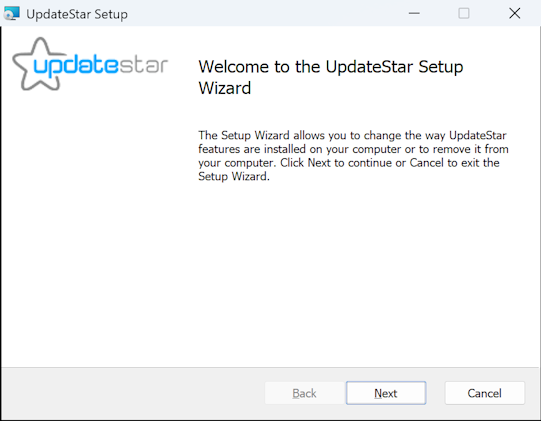
Follow the installation wizard prompts to complete the setup on your computer. Once installation is finished, launch UpdateStar by double-clicking the desktop icon or selecting it from your Start menu.
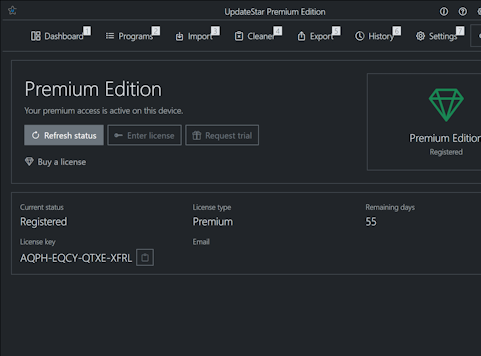
Activate Your Premium License
To access the full capabilities of UpdateStar Premium — including 20× more updates and advanced features — you'll need a Premium Edition license.
License Options
- Purchase: Get your Premium license for $34.95 with our unconditional 30-day money-back guarantee
- Trial: Request a free trial license to evaluate Premium features
Once you receive your Premium license via email, enter the license code through the "Premium Edition" menu in the UpdateStar client.
Scan for Available Updates
You're now ready to perform your first system scan. Click the "Update Programs" icon in the menu, or use the "Search for updates" button on the Start page. Your first scan will automatically activate your Premium Trial License.


The scan will complete within moments, displaying all available updates. Download updates by clicking on program names or switching to "Program List" view in the menu for a comprehensive overview.
Setup Complete!
UpdateStar Premium is now configured and will automatically deliver updates and minor upgrades directly to your computer, keeping your software current and secure.
Quick Tips
- Run your first scan immediately after activation
- Enable automatic scheduling for daily scans
- Review security recommendations for critical updates
- Export your software setup for backup purposes
Estimated Time
Complete setup typically takes:
- Installation: 2 minutes
- License activation: 1 minute
- First scan: 2-3 minutes
Premium Benefits
- 20× more updates
- Security advisories
- Direct downloads
- 24×7 scheduling
- Registry cleaner