


"I have been using UpdateStar for almost two years now. It delivers so many critical updates." — Steve S.
Ensures your software stays updated and protected.
When and How to Use UpdateStar
Outdated software poses significant security and performance risks for every computer user. Each day, software vendors publish numerous updates addressing security vulnerabilities and introducing new features.
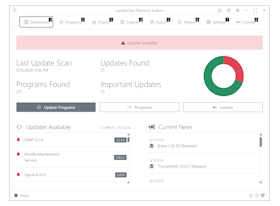
UpdateStar users typically benefit from our platform in three primary scenarios:
Existing Computer and Software Setup
UpdateStar serves as the ideal complement to Windows Update Service, providing comprehensive third-party software management. Our platform enhances your system security by keeping all third-party software installations current and optimized.Key Features for Existing Systems
- Comprehensive security analysis and update prioritization
- 24×7 automated scheduling for hands-free maintenance
- Reliable, verified downloads from trusted sources
- Access to the world's largest software database (1,818,000+ applications)
- Complete software lifecycle management in one interface
New Windows Computer Setup
UpdateStar streamlines the process of equipping your new computer with essential software. Discover, download, and install your preferred applications from our extensive database, ensuring a smooth transition to your new system.Quick Start Solution
Accelerate your setup with our FREE UpdateStar Software Packages — curated collections of essential applications for immediate installation.
Perfect for: Setting up a new computer with all your familiar tools in minutes rather than hours.
Whether you're migrating from an old system or starting fresh, UpdateStar provides instant access to verified software titles tailored to your needs.
New Computer with Pre-installed Bloatware
Transform your bloatware-laden new computer into a streamlined, efficient system. UpdateStar serves as your comprehensive software management console, enabling you to remove unwanted pre-installed applications and replace them with software you actually need.Complete Bloatware Management
- Identify and Remove: Use UpdateStar's complete software management console to efficiently uninstall all unnecessary bloatware applications
- Selective Installation: Install only the software you need from our verified database — no more, no less
- Ongoing Maintenance: Automatically scan and update 1,818,000+ third-party applications
- Security Enhancement: Ensure critical security updates are never missed with continuous monitoring
UpdateStar complements your existing security software by providing essential third-party application management — a critical component often overlooked in system security strategies.
Why Choose UpdateStar?
Regardless of your scenario, UpdateStar provides comprehensive software management, enhanced security through timely updates, and peace of mind knowing your system is optimized and protected.
Security First
UpdateStar monitors security vulnerabilities across all your installed software, ensuring you're always protected against the latest threats.
Performance Optimization
Keep your software running at peak efficiency with automatic updates that include performance enhancements and bug fixes.
Time Savings
Automated scanning and 24×7 scheduling means you spend less time managing updates and more time being productive.
Comprehensive Database
Access to over 1.8 million software titles ensures you'll find and maintain everything you need.
Get Started Today
Experience the difference comprehensive software management makes for your system's security and performance.
Download UpdateStar View Setup Guide