


"I have had no device driver problems at all since updating them with UpdateStar Drivers!" — Mike R.
Keep device drivers updated.
Getting Started with UpdateStar Drivers
This comprehensive guide will walk you through the installation and activation process for UpdateStar Drivers, enabling you to maintain optimal hardware functionality and system stability through automated driver management.
Quick Setup Overview
UpdateStar Drivers setup is straightforward and requires minimal time investment. Complete these three essential steps to begin managing your device drivers professionally.
Estimated Time: 5-7 minutes
Download and Install
Begin by downloading the UpdateStar Drivers installation package from our secure download page.
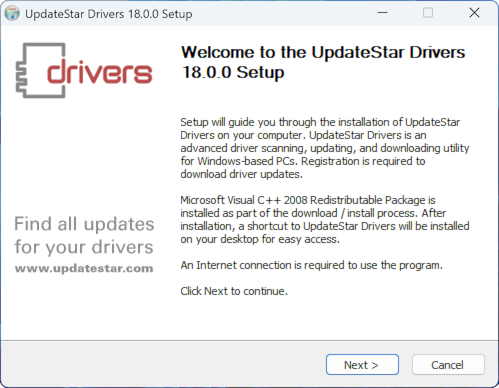
Installation Steps
- Download the installation file from the download page
- Run the installer and follow the setup wizard prompts
- Accept the license agreement and choose your installation preferences
- Complete the installation process
- Launch UpdateStar Drivers by double-clicking the desktop icon or selecting from the Start menu
All installation files are digitally signed and undergo rigorous security testing to ensure your system's safety.
Scan for Driver Updates
Initiate your first comprehensive hardware scan by clicking the "Start Scan" button in the application interface. The initial scan typically completes within 2-5 minutes, depending on your system configuration.

After Scanning Completes
The scan results display all available driver updates for your hardware devices. You have several options for managing these updates:
- Individual Downloads: Click the "Download" button next to specific drivers to update selected devices
- Batch Downloads: Use the "Download All" button to retrieve all available updates simultaneously
- Installation: After downloads complete, click "Install" to apply the driver updates
- Backup Protection: We strongly recommend creating backups before installing updates — UpdateStar Drivers provides automatic backup functionality
Activate Your License
To unlock full functionality, including driver downloads and installations, you'll need to activate UpdateStar Drivers with a valid license.
License Options
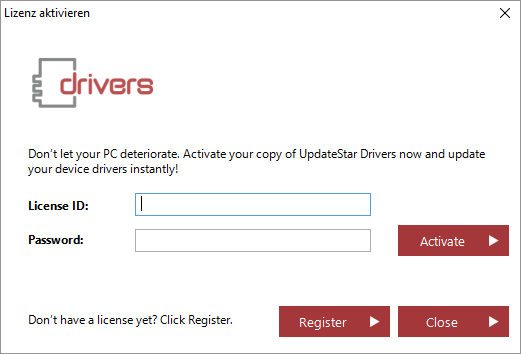
Activation Process
- Purchase your preferred license from our secure store
- Check your email for the license key and activation instructions
- Open UpdateStar Drivers and navigate to the "License" section
- Enter your license key in the provided field
- Click "Activate" to unlock full access to driver downloads and installations
Setup Complete!
You're now ready to maintain your device drivers professionally. UpdateStar Drivers will keep your hardware operating at peak performance with minimal effort on your part.
Quick Tips
- Always create driver backups before updates
- Run scans regularly for optimal performance
- Download critical driver updates immediately
- Configure scheduled scans for automation
Estimated Time
- Installation: 2-3 minutes
- First Scan: 2-5 minutes
- License Activation: 1 minute
- Total Setup: 5-7 minutes
Key Benefits
- Automatic driver backup protection
- 189,000+ supported devices
- Verified downloads from manufacturers
- One-click driver rollback
- Scheduled scanning automation
Need Help?
Our dedicated support team is available to assist with installation, activation, or any technical questions.
Contact Support