

"Brought back my hidden and forgotten passwords in seconds." — Paula M.
Recover hidden passwords for software programs.
Password Finder Use Cases & Applications
Password Finder provides comprehensive credential recovery solutions for home users, IT professionals, and system administrators. Understanding when and how to deploy this powerful tool maximizes its value for password management, account recovery, and security auditing scenarios.
Primary Use Cases
Account Recovery
Recover lost or forgotten passwords from web browsers, email clients, and instant messaging applications when account credentials are no longer accessible.
System Migration
Extract stored credentials before upgrading hardware or migrating to a new computer system, ensuring seamless transition without losing access to configured accounts.
Security Auditing
Identify stored passwords within your organization's workstations to audit security policies and ensure compliance with credential management best practices.
Credential Backup
Create comprehensive backups of all stored passwords and authentication data across multiple applications, protecting against data loss during system failures.
Network Administration
Scan multiple computers across your network simultaneously to recover credentials from remote systems, streamlining IT administration tasks.
Emergency Recovery
Quickly recover critical credentials during emergency situations when password reset procedures are unavailable or time-consuming.
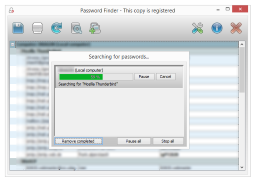
Technical Capabilities
Supported Software Programs
Web Browsers
- Mozilla Firefox (all versions)
- Google Chrome 1.0-6.x
- Internet Explorer 4-9
Email Clients
- Microsoft Outlook
- Outlook Express
- Mozilla Thunderbird 1.0-3.x
- Windows Live Mail (all versions)
- IncrediMail (all versions)
Instant Messengers
- MSN Messenger 1.x-7.x
- Windows Live Messenger
- Google Talk (all versions)
FTP Clients
- WinSCP (all versions)
- SecureFX (all versions)
When to Use Password Finder
- Forgotten browser or email passwords
- Preparing for system migration or upgrade
- Creating password backup documentation
- Auditing stored credentials for security
- Recovering FTP or network credentials
- IT administration of multiple workstations
- Emergency account access restoration
- Transitioning to password manager software
Business & IT Benefits
- Reduce Downtime: Quickly recover credentials without lengthy password reset procedures
- Network Efficiency: Scan multiple computers simultaneously across your infrastructure
- Security Auditing: Identify weak or exposed credentials stored on workstations
- Cost Savings: Eliminate expensive help desk calls for password recovery
- Compliance Support: Document credential management for audit requirements
Home User Benefits
- Easy Recovery: Restore access to forgotten online accounts instantly
- Migration Made Simple: Transfer all credentials when upgrading computers
- Password Backup: Create secure backups of all stored passwords
- User-Friendly: No technical expertise required for credential recovery
- Time Savings: Avoid frustrating password reset procedures
Application Categories
Quick Facts
- 108+ supported applications
- Local & Network scanning capability
- Multiple Export formats available
- Regular Updates to application database
- Professional Support included
Need Help?
View our comprehensive getting started guide or contact technical support for assistance.
View Getting Started Guide