

"Searched my computers in seconds and found the missing software licenses I have been looking for." — Richard B.
Find lost software licenses on your computer.
Getting Started Guide
Welcome to Product Key Finder! This comprehensive guide will help you install, configure, and start recovering your software licenses in just a few minutes. Follow these simple steps to begin protecting your valuable software investments.
Getting started with Product Key Finder is straightforward. You'll be scanning and recovering license keys within minutes of installation.
Download & Installation
Download the Installer
Visit our download page to get the latest version of Product Key Finder. The installer is a small file (approximately 3 MB) that downloads quickly.
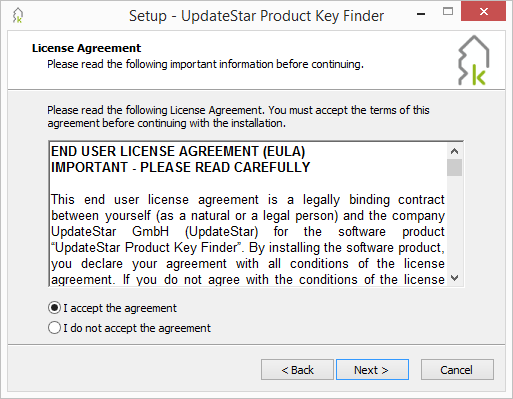
Installation wizard guides you through the setup process
Complete the Installation
- Double-click the downloaded installer file
- Follow the installation wizard instructions
- Accept the license agreement
- Choose your installation directory (or use default)
- Click "Install" to complete the setup
Launch the Application
After installation completes, launch Product Key Finder by double-clicking the desktop icon or selecting it from your Start menu.
Scan for License Information
Start Your First Scan
When you launch Product Key Finder, you'll see the main interface with scanning options. Begin discovering your software licenses by clicking the "Scan local computer" button.

Click "Scan local computer" to begin license discovery
Scan Duration: The first scan typically completes within 30-60 seconds, depending on the number of programs installed on your computer.
What's Being Scanned: Product Key Finder analyzes your system registry, program files, and installation records to locate license information from 8,000+ supported products.
Review Your Results
After scanning completes, you'll see a comprehensive list of discovered licenses organized by software product. The interface displays product names, publishers, and license information in an easy-to-read format.
Upgrade to Full Version
Trial Limitation: The demo version displays only the first 4 characters of each license key. Upgrade to the full version to view, export, and print complete license information.
Choose Your License
Select the license that fits your needs:
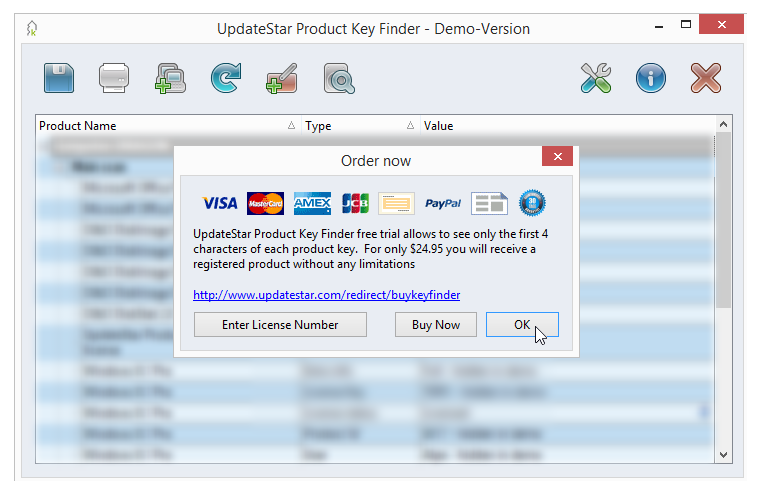
Enter your license key to unlock all features
Activate Your License
- Complete your purchase through our secure checkout
- Receive your license key via email (usually within minutes)
- In Product Key Finder, go to Help → Register
- Enter your license key and click "Activate"
- Enjoy full access to all features — no reinstallation required!
Instant Activation: Your license activates immediately, unlocking complete license information, export capabilities, and all premium features.
Next Steps
Now that you're set up, explore these additional features:
Need Additional Help?
If you have questions or need assistance, we're here to help you get the most out of Product Key Finder.
Quick Setup Checklist
- Download installer
- Run installation wizard
- Launch Product Key Finder
- Scan local computer
- Review discovered licenses
- Upgrade to full version
Time Required
- Download: ~30 seconds
- Installation: 1-2 minutes
- First Scan: 30-60 seconds
- License Activation: Instant
- Total Setup: ~5 minutes
Trial vs. Full Version
| Feature | Trial | Full |
|---|---|---|
| Scan Computers | ||
| View Full Keys | ||
| Export Licenses | ||
| Network Scan | ||
| Deep Scan |
System Requirements
- Windows 11, 10, 8, 7, Vista, XP
- 256 MB RAM minimum
- 10 MB disk space
- Internet for license activation